Check The Model Number
Some HP printers ending with the letter “e” may be tied to HP+ requirements.

Automatic replenishment can be convenient, but some HP+ configurations may affect your ability to use compatible cartridges.
Understanding the difference between HP+ printers, Instant Ink subscriptions and standard HP printers can help you make a more informed purchase decision.
Some HP printers ending with the letter “e” may be tied to HP+ requirements.
HP+ and Instant Ink are not exactly the same thing and may have different implications.
Knowing the printer model and program conditions can help preserve your supply options.
When you buy a printer ending with the letter “e”, such as an OfficeJet 8010e, the printer may be associated with HP+ features and requirements that can limit the use of some compatible cartridges.
That means customers who want to preserve the option of buying alternative cartridges should review the printer model and HP+ conditions before completing their purchase.
If you previously registered for HP+ or Instant Ink but your printer model does not end with the letter “e”, your original content explains that cancelling the subscription may allow you to start purchasing alternative cartridges again.
Review the procedure below to cancel your subscription on an eligible printer and confirm the conditions that apply to your specific model and account.
Follow the steps below based on the workflow shown in your original page.
Go to hpinstantink.com/signin, log in to your account and select the printer model that you want to unsubscribe.
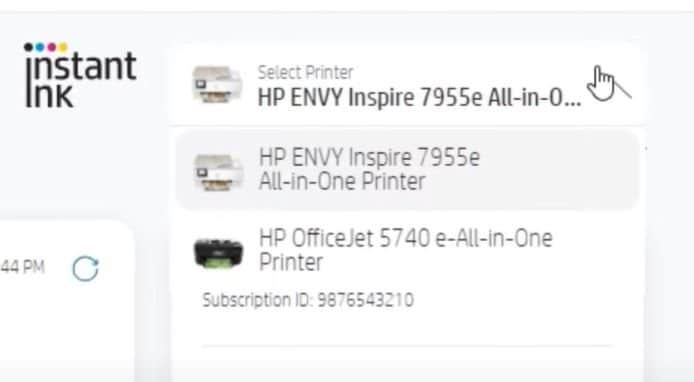
Open the subscription settings for the selected printer and click on “Change Plan”.
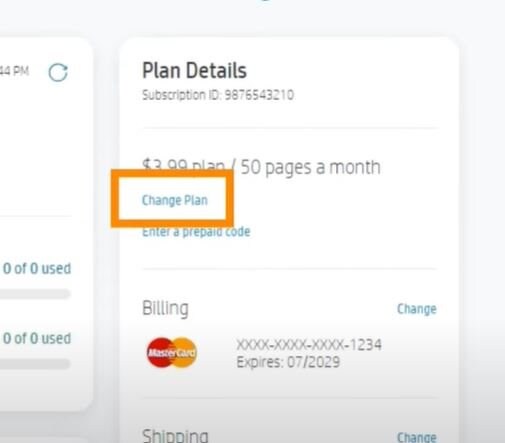
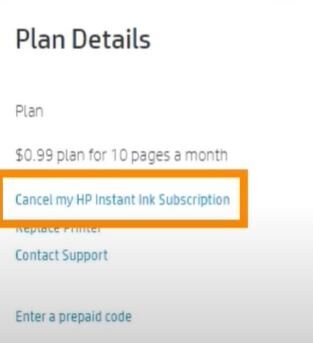
Click on “Cancel my subscription” and follow the instructions shown in your HP account.
Printer model names, subscription programs and firmware policies can all affect the cartridge options available to the user.
Your original content identifies models ending in “e” as an important purchase consideration for users who want to preserve access to compatible cartridges.
Instant Ink is an automatic replenishment subscription. On eligible non-“e” printers, cancelling the subscription may provide more flexibility in cartridge purchasing.
Customers who prefer alternative cartridges should verify the printer model and program conditions before purchase or enrollment.
If you are unsure whether your printer or subscription can be changed, contact support before modifying your account or replacing equipment.
Your original page uses models ending in “e” as the key indicator to review when considering HP+ and compatible-cartridge restrictions.
No. They are related HP programs but are not identical. The specific printer model and enrollment conditions matter.
Your original page provides a cancellation procedure for users with eligible printers that do not end in “e”.
Contact support before changing your account or printer configuration if you are uncertain about the applicable procedure.
Contact us if you need help understanding your printer model, subscription or cancellation procedure.